 Nancy Gan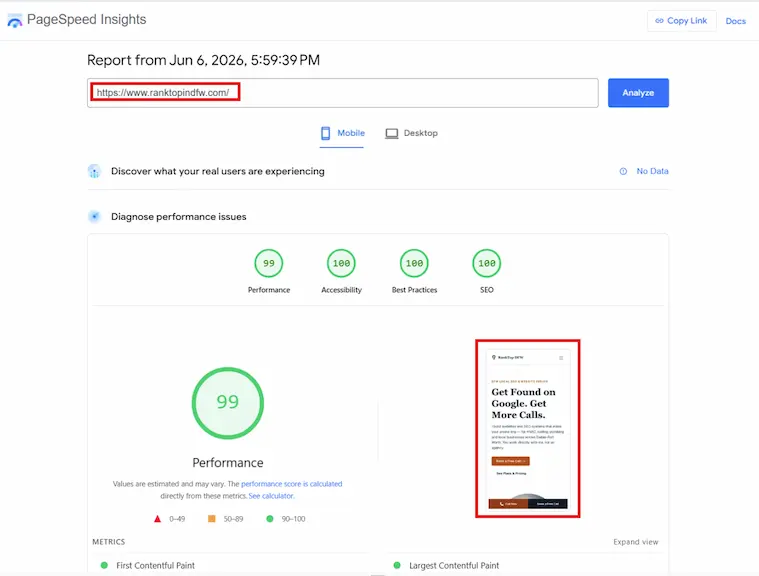
A slow contractor website does not just feel unprofessional — it quietly kills calls before a single customer reads your phone number. At RankTop DFW, I see this pattern constantly in site audits: a contractor spending money on ads or relying on referrals, while their website silently loses half of all visitors in the first three seconds. The site looks fine on a desktop in the office. On a phone in a driveway, it never fully loads.
This post explains exactly how load time translates to lost calls, what the numbers look like, and what a fast site actually does differently.
The Scenario That Plays Out Every Day
A homeowner notices a roof leak after a storm. They pull out their phone, type "roofer in Plano," and tap the first result that isn't an ad. The page starts loading. Three seconds pass. The spinner is still going. They hit the back button and tap the next result.
That contractor just paid — through SEO effort, through years of reviews, through however they got that ranking — to get that tap. And they lost it before the page loaded.
This is not a hypothetical. 53% of mobile visits are abandoned if a page takes longer than 3 seconds to load (Google, Think With Google). When load time increases from 1 second to 10 seconds, the probability of a visitor leaving before reading anything increases by 123% (Google, Think With Google).
For a roofer, a plumber, or an HVAC contractor whose customer is searching during or right after a problem — a leak, a breakdown, a storm — patience is the first thing that runs out.
What "Slow" Actually Means
Three seconds sounds fast. It does not feel fast on a phone with a shaky connection.
Here is what is actually happening during those three seconds on a slow site: the browser sends a request to the server, waits for the server to build the page (querying a database, running PHP, loading plugins), receives the first byte of HTML, then downloads all the images, stylesheets, and scripts before anything appears on screen. Each step adds time. Each plugin on a WordPress site adds more.
Google measures this with three specific metrics called Core Web Vitals:
- Largest Contentful Paint (LCP) — how long until the main content (your headline or hero image) appears. Google's "good" threshold is under 2.5 seconds.
- Cumulative Layout Shift (CLS) — how much the page jumps around as it loads. Elements shifting after a customer tries to tap "Call Now" is a CLS problem.
- Interaction to Next Paint (INP) — how quickly the page responds after a customer taps a button or a link.
Google uses these three metrics as a ranking signal. When two contractor sites compete for the same search in your city, the site that passes all three has a structural advantage — even if both have similar reviews, similar content, and similar authority.
Why Most Contractor Websites Are Slow
The slow sites I audit most often share the same three problems.
-
Too many plugins on WordPress — The average small business WordPress site runs more than 20 active plugins. Each one loads its own PHP file, stylesheet, and often a JavaScript file on every single page request. A plugin that adds 30ms of load time alone becomes 600ms of compounding overhead across 20 plugins, before the theme's own assets are counted. Most business owners have no idea what half these plugins do or when they were installed.
-
Unoptimized images — A contractor's site typically has photos of completed jobs — roofs, HVAC units, finished rooms. Those photos come off a phone camera at 4–8MB each. Uploaded directly to WordPress without compression, they are served full-size to a mobile phone on a cell connection. One hero image at 6MB is enough to guarantee a 5+ second load time on mobile.
-
Cheap shared hosting — On shared hosting, your site shares a server with dozens or hundreds of other sites. When any of them get traffic, your server slows down. The result is a Time to First Byte (TTFB) — the time from a browser's request to the first byte of your page arriving — of 400–800ms before any content has loaded. The best-performing managed WordPress hosts average 365ms TTFB (HostingStep, WordPress Hosting Benchmarks 2025). On basic shared hosting, 600–800ms is typical.
A site with all three problems — heavy plugins, unoptimized images, shared hosting — routinely scores below 30 out of 100 on Google's mobile speed test. That is not a minor inconvenience. That is a site that is actively invisible to a large portion of the people who try to visit it.
How to Check Your Own Site Right Now
You do not need to hire anyone to find out if your site is slow. Google provides a free tool that gives you the same data I use in audits.
- Open a browser and go to pagespeed.web.dev
- Type in your website address and click Analyze
- Make sure you are looking at the Mobile tab — not Desktop
- Look at your score (0–100) and your LCP number
A score below 50 on mobile means the site is failing. A score of 50–89 means it needs improvement. A score of 90+ means it is performing well.
The report below your score lists the specific issues in order of how much time they add — "Eliminate render-blocking resources," "Properly size images," "Reduce unused JavaScript." Each line is a specific problem with a specific cost in seconds. You can see exactly what is slowing you down and by how much.
If you see LCP above 3 seconds on mobile, every contractor in your city with a faster site is beating you on that search — regardless of how long you have been in business or how many reviews you have.
The Ranking Spiral a Slow Site Creates
Page speed does not just lose you the visitor who bounced. It damages your ranking over time in a compounding way.
Google measures how often users click your site and then immediately return to the search results — a behavior called a "pogo stick." When a slow page causes visitors to leave before reading anything, Google reads that as a signal that your page did not satisfy the search. Over time, Google reduces how often it shows your site, which means fewer clicks, which means fewer calls.
At the same time, competitors with faster sites are accumulating the positive signal — visitors who stay, read, and call. Google reinforces the pages that keep people engaged and demotes the ones that push people away.
A slow site does not stay in place. It slowly loses ground.
What a Fast Site Actually Looks Like
A fast contractor site loads in under 2 seconds on mobile and scores 90+ on Google's mobile speed test. Here is what produces that score:
| Factor | Slow site (typical WordPress) | Fast site (Next.js on edge hosting) |
|---|---|---|
| Time to First Byte | 400–800ms | ~45ms |
| Hero image | 4–8MB, uncompressed | Automatically compressed, served in WebP format at mobile size |
| Plugins | 20+ active, each adding CSS and JS | Zero — no plugin system |
| Hosting | Shared server, variable performance | Global edge network — file delivered from nearest location |
| LCP (typical mobile) | 3.0–6.0 seconds | 1.0–1.8 seconds |
The difference is not a matter of fine-tuning. It is a matter of architecture. A site built on static generation — where the HTML is pre-built and delivered instantly from a nearby server — eliminates the server processing time, the database queries, and the plugin overhead that cause slow WordPress sites to fail.
For most DFW contractors competing against other local businesses (not national directories), introducing a site that loads in under 2 seconds into that competitive field is a meaningful ranking advantage — not just because of the speed signal, but because the slow sites losing visitors are signaling to Google that they are not worth ranking.
What This Means If You Are Getting Traffic But Not Calls
If Google Search Console shows people clicking your site but your phone is not ringing, page speed is one of the first things to check — alongside mobile layout and a clear tap-to-call button above the fold.
A visitor who clicks your link, waits 5 seconds, and gives up never had the chance to see your number. They are counted as a click in your analytics. They are not counted as a call. The gap between clicks and calls on slow contractor sites is almost always wider than it should be.
RankTop DFW's website design for DFW contractors builds every site on Next.js with Vercel edge hosting because this is the only architecture that reliably produces sub-2-second load times on mobile without ongoing maintenance work. The speed advantage is built in from the first deploy — not added later with plugins or caching workarounds.
If you are a DFW roofing contractor or any home service business watching your call volume stay flat while your Google traffic looks reasonable, a speed audit is the right starting point.
RankTop DFW offers a Technical SEO Audit that includes a full PageSpeed analysis, a plain-English breakdown of what is slowing your site down, and a video walkthrough of every finding — so nothing gets lost in translation. If the site is fixable without a rebuild, I will tell you that. If the architecture is the problem, you will know exactly why.